What Is CPU Cache? L1, L2, L3, and Their Effect on Performance
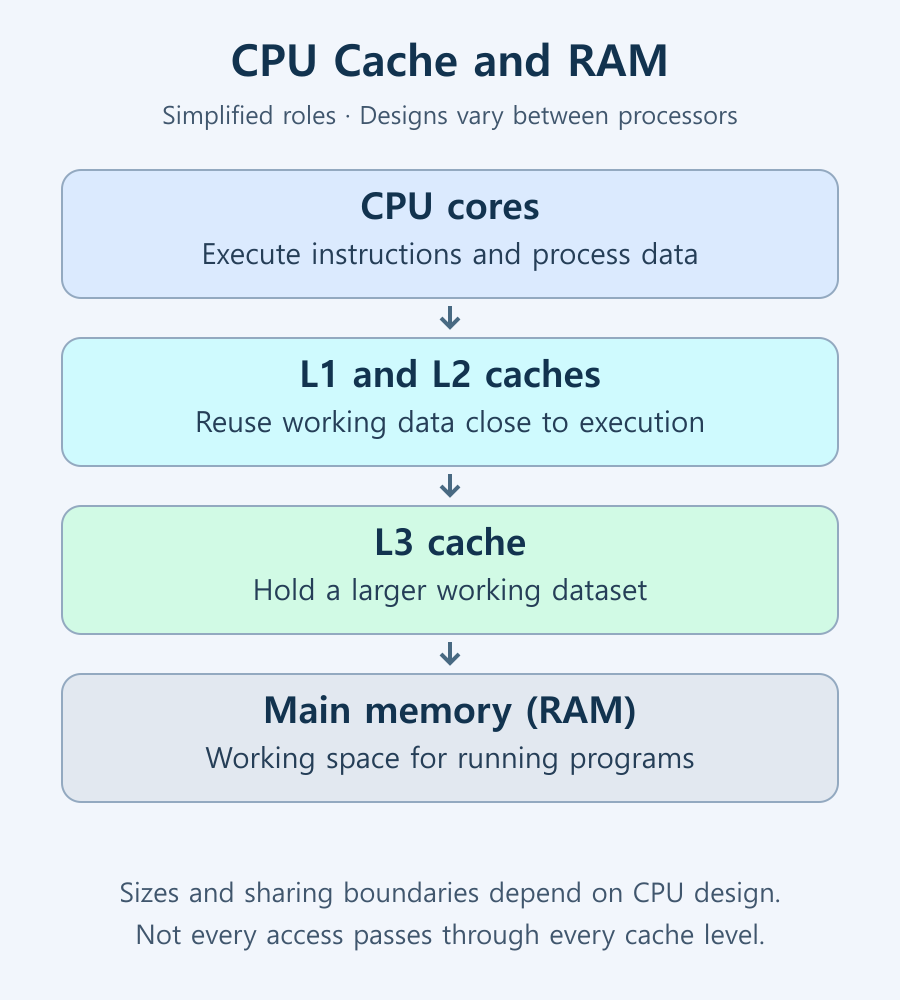
CPU cache is fast memory that keeps some instructions and data close to the processor, reducing the need to wait for main memory. L1, L2, and L3 identify cache levels: nearer levels are generally smaller and faster, while outer levels provide more capacity.
Why does a CPU need cache?
Running programs and their data reside in random access memory (RAM). If execution units had to wait for RAM on every access, they would spend more time idle. Caches exploit the likelihood that recently used or nearby data will be needed again. Repeatedly reading the same small array in a loop is a useful example.
Finding the required content in a cache is a cache hit; failing to find it there is a cache miss. A miss can require access to another level or main memory, adding waiting time. Programs have different access patterns and hit rates, so an increase in cache capacity does not benefit every workload equally.
How L1, L2, and L3 differ
| Level | Typical role | What to check in a specification |
|---|---|---|
| L1 | A small cache close to execution, often separated into instruction and data caches | Per-core capacity and instruction/data distinctions |
| L2 | A larger nearby cache that complements L1 | Whether it is private to a core or shared by a group of cores |
| L3 | A larger cache level available to multiple cores | Sharing boundaries and distribution across chips or core groups |
This describes common roles rather than a universal wiring diagram. Some cores share L2, and a multi-chip CPU may not provide identical access to all of its L3 capacity as one uniform pool. AMD’s Zen architecture overview provides contemporary references for differences in core and cache designs.
Can cache replace RAM or an SSD?
A larger cache does not replace the RAM needed by a large program or the SSD needed to store files. Cache is a small, fast resource managed by hardware for active work. RAM holds the working state of running programs, while an SSD retains files when power is off.
If insufficient RAM causes frequent movement of data to storage, more CPU cache does not make that capacity problem disappear. Conversely, having enough RAM does not eliminate all delays caused by cache misses. This is why CPU memory specifications distinguish capacity from transfer rate and other characteristics.
Is a larger cache always faster?
The important question is whether frequently reused working data fits in the cache. If a small dataset already fits in a nearby level, a larger outer cache may add little benefit. If extra capacity avoids repeated RAM accesses, it can help. Streaming through a large dataset once is a different access pattern again.
AMD’s Ryzen X3D announcement describes processors using 3D V-Cache. The presence of that technology and the size of a performance gain in a specific application are separate questions. Game choice, graphics settings, frequency, and power conditions still matter.
How to compare cache specifications
- Open the exact model’s manufacturer page and separate L1, L2, and L3 values. A list such as AMD’s processor specifications can help identify the individual fields.
- Check whether a value is per core or a total. Do not treat total L2 and L3-only capacity as the same measurement.
- Consider core count and structure. A larger total L2 can result from adding more cores rather than giving each core a larger cache.
- Compare the actual workload under equivalent conditions. If a larger-cache model costs more, establish whether your software benefits from that difference.
Adding L2 and L3 into one total does not create a reliable performance ranking. The levels differ in access characteristics and sharing. Understanding CPU core counts and clock speed alongside cache helps you read the specification sheet more accurately.
The Ryzen 7 9700X specification lists eight cores, 8MB of L2, and 32MB of L3 separately. The 8MB L2 entry is not 8MB for each core. Dividing the total by eight gives an average of 1MB per core, but division alone is not a reliable way to infer the physical cache layout of other processors.
Likewise, 32MB of L3 is not 32MB duplicated for every core. Shared cache capacity is available within the design’s sharing domain, which must be checked in architecture documentation. Adding L2 and L3 gives 40MB, not one uniform 40MB cache. This example distinguishes totals from per-core figures; it is not a template for every Zen processor.
When should cache influence a buying decision?
For a cache-sensitive game or repeated professional task, prioritize benchmarks of that workload. Look for consistent improvements in frame times or completion time, not only a favorable average. If the GPU or memory configuration differs, the result cannot be attributed to cache alone.
Ordinary PC maintenance does not require manually clearing CPU cache or allocating its size. When a system is slow, first investigate evidence of RAM pressure, storage waiting, thermal or power limits, and background activity rather than assuming cache capacity is the cause.

What Is CPU Cache? L1, L2, L3, and Their Effect on Performance
Understand how CPU cache reduces memory waiting time, how L1, L2, and L3 differ, and how to read capacity and sharing specifications. Learn when larger caches can help real workloads.

What Are CPU Threads? Cores, Logical Processors, and Software Threads
Learn the difference between hardware threads, software threads, logical processors, and physical cores. Understand SMT resource sharing and check the counts reported by Windows.

Monitor / USB-C Video, Charging, and USB Data: What to Check
Check the separate requirements for USB-C monitor video, USB data, and laptop charging. Learn how to select ports and cables, assess bandwidth, and troubleshoot each function.

Monitor / KVM, PBP, and PIP: Differences and Two-Computer Setup
Distinguish KVM input and USB switching from PBP and PIP picture modes. Set up two computers with the correct video, upstream mapping, and peripheral checks.

What Is CPU Clock Speed? Base Frequency, Boost Clock, and Performance
Learn what GHz measures, how base and maximum boost frequencies differ, and why operating speed changes. Find out which specifications and real workloads to compare alongside clock speed.

Monitor / How to Check a New Monitor for Pixel Defects and Uniformity
Inspect a new monitor using solid colors, uniformity patterns, and your real workload. Distinguish pixel defects, content artifacts, reflections, and backlight effects, and prepare support records.

Monitor / Glossy vs. Matte Screens: Differences and How to Choose
Compare glossy and matte monitor reflections, surface texture, and readability. Choose using your room lighting and content, and check the conditions for films and cleaning.

What Is Integrated Graphics? Differences from a Graphics Card and How to Choose
Compare integrated graphics with a separate graphics card, including shared RAM and upgrade options. Check CPU graphics support, workload requirements, and common causes of missing display output.

Monitor / Buying a Monitor Arm: VESA, Weight, and Desk Checks
Check VESA fit, screw requirements, minimum and maximum load, center of gravity, and desktop construction. Follow practical steps for installation, tension adjustment, and cable clearance.
How to Read CPU Memory Specifications: DDR Type, Channels, Capacity, and Speed
Read a CPU’s RAM type, maximum capacity, channel count, and configuration-dependent transfer rates. Check DIMMs, ranks, XMP or EXPO profiles, motherboard QVLs, and BIOS support before upgrading.