What Are CPU Threads? Cores, Logical Processors, and Software Threads
In a CPU specification, threads are hardware execution contexts that the operating system can use as logical processors. They are different from software threads, which are execution flows created by programs. An eight-core, 16-thread CPU does not contain 16 physical cores, and it does not limit you to running 16 programs.
Why the word thread has two meanings
In software, a thread is an execution flow to which the operating system can allocate processor time. One process can contain a thread handling user input, another reading files, and others performing calculations. Threads within that process share its address space and resources while maintaining their own execution state. Microsoft’s overview of processes and threads defines this relationship.
A CPU advertised as having 16 threads is counting hardware execution contexts, not threads created by applications. The operating system assigns ready-to-run software threads to logical processors. It can switch to another thread when one waits or its scheduled time ends.
| Term | What it counts | Example |
|---|---|---|
| Physical cores | Physical instruction-execution resources | Eight cores means eight physical cores. |
| Hardware threads / logical processors | Hardware execution contexts | 16 CPU threads means 16 logical processors. |
| Software threads | Program execution flows | Programs can collectively create hundreds or thousands. |
Separate processes can also share data through explicit mechanisms such as shared memory. That differs from threads in the same process sharing an address space by default. The distinction here is intended to help you interpret CPU specifications, rather than to provide a complete guide to interprocess communication.
How SMT and Hyper-Threading work
Simultaneous multithreading (SMT) allows one physical core to support multiple hardware threads. Intel’s Hyper-Threading is one implementation. A supported core can expose two logical processors to the operating system.
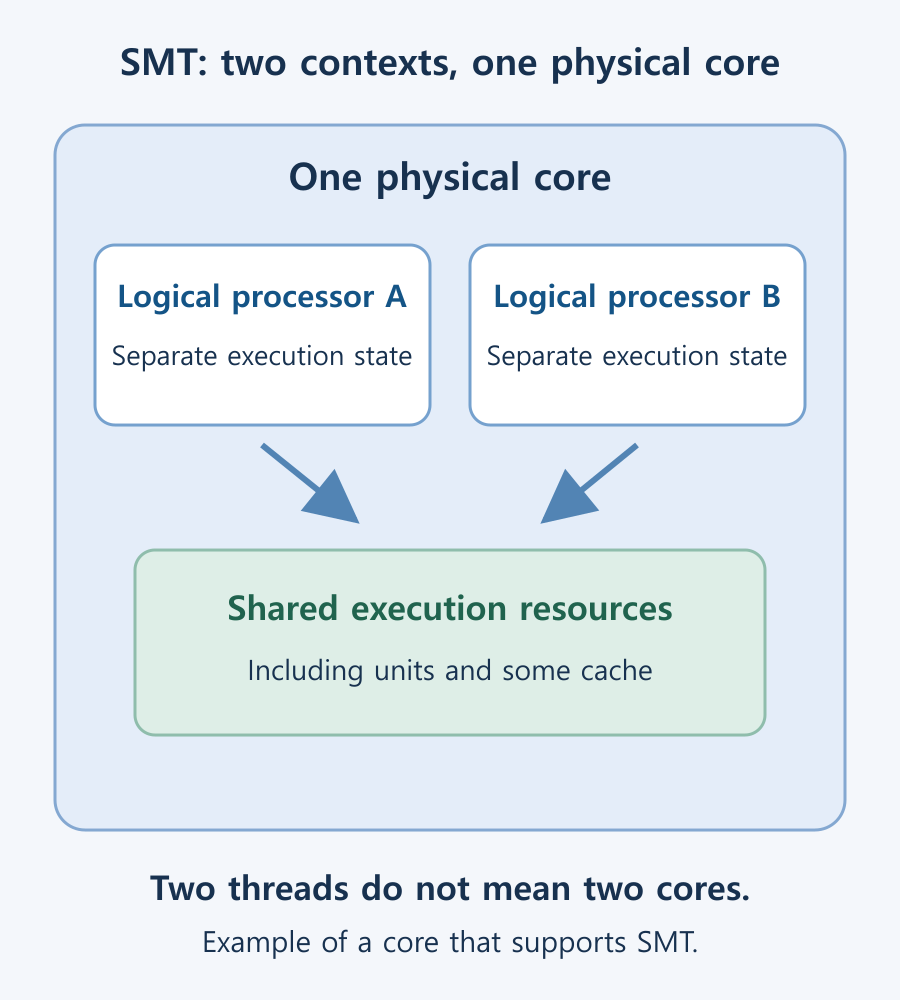
The two contexts maintain their own execution state, but share resources such as execution units and some caches within the physical core. A second thread may use capacity that the first thread is not using effectively. Intel’s threading optimization guidance describes this sharing of resources between hardware threads on a core.
An eight-core, 16-thread CPU is therefore not equivalent to a 16-core CPU. Extra contexts can improve throughput, but they do not double the physical execution resources. Availability and activation depend on the CPU model and BIOS or UEFI settings.
Can a PC run more software threads than CPU threads?
Yes. The logical processor count is not a limit on the number of software threads that can exist. The operating system divides processor time among threads, allowing more threads to make progress than there are logical processors.
For example, if 20 threads are ready to run on a PC with four logical processors, the scheduler allocates time according to priorities, readiness, and other factors. Not all 20 are executing on the CPU at the same instant, even though several programs appear to progress together.
This distinction separates concurrency, in which work overlaps in progress, from parallel execution on multiple execution resources. Moving file or network waits off a user-interface thread can improve responsiveness without adding cores. Conversely, creating more calculation threads than necessary can add switching overhead and resource contention.
When more threads can improve performance
Additional hardware threads can help throughput when there is enough independent CPU work and the program can use them. Multiple-file conversions, parallel builds, and some rendering workloads are useful cases to compare. The actual benefit varies with the software and data.
- If most work depends on one software thread, additional logical processors have limited opportunities to help.
- SMT benefits may be small when two threads compete heavily for execution units or cache on the same core.
- A memory or storage bottleneck can leave the CPU waiting even when more execution contexts are available.
- Low overall CPU utilization can conceal a busy logical processor that is limiting one part of the application.
Disabling SMT does not universally improve games or solve all security concerns. Keep the default configuration unless you have a specific reason to change it. If you do compare settings, use the same workload conditions, record the original setting, and keep a way to restore it.
Thread count is not always twice the core count
Some CPUs provide two threads on every core. Others provide one, or use a mixture depending on the core type. The Core i7-12700K has 12 cores and 20 threads, while the Core Ultra 7 265K has 20 cores and 20 threads. Check Total Cores and Total Threads in the exact model’s official specification rather than calculating them from the brand or product family.
See CPU cores and performance comparisons for the meaning of a physical core and examples of hybrid configurations. A larger thread count is not, by itself, evidence that one processor is faster in every application.
How to check cores and logical processors in Windows
- Open Task Manager → Performance → CPU using Ctrl + Shift + Esc.
- Compare Cores with Logical processors. Do not confuse either with Task Manager’s count of software threads.
- Right-click the CPU graph and select Change graph to → Logical processors to inspect utilization by execution context. Wording can vary slightly between Windows versions.
You can also run this read-only command in PowerShell. It does not require a separately installed module or an administrator session:
Get-CimInstance Win32_Processor |
    Select-Object Name, NumberOfCores, NumberOfLogicalProcessors
NumberOfCores reports cores and NumberOfLogicalProcessors reports logical processors. A system with multiple CPU sockets can return a row for each processor. Microsoft’s Win32_Processor documentation defines these properties.
If a result differs from the official specification, check whether you are inside a virtual machine or whether firmware has disabled cores or SMT. The command reports the configuration visible in the current environment. It is not a benchmark or a complete detector of every kind of core topology.
What Is Integrated Graphics? Differences from a Graphics Card and How to Choose
Compare integrated graphics with a separate graphics card, including shared RAM and upgrade options. Check CPU graphics support, workload requirements, and common causes of missing display output.
M.2 SSD Overheating: Symptoms, Temperature Checks, and Cooling
Learn how to distinguish possible thermal throttling from other SSD slowdowns, check temperatures with CrystalDiskInfo or manufacturer tools, and improve cooling using model-specific guidance.

Laser Printers / Features, Advantages, and Disadvantages
Understand how laser printers work, what toner and drums do, and where the technology's strengths and limitations matter. Compare document printing, consumable costs, paper compatibility, and inkjet alternatives to decide whether a laser printer suits your needs.
What Is a CPU Socket? Types and Motherboard Compatibility Checks
Understand CPU sockets and LGA, PGA, and BGA connections. Follow a practical checklist for motherboard CPU support, BIOS versions, memory, power, and cooler compatibility.

What Are CPU Threads? Cores, Logical Processors, and Software Threads
Learn the difference between hardware threads, software threads, logical processors, and physical cores. Understand SMT resource sharing and check the counts reported by Windows.

Home Printer Buying Guide / Printing Technologies, Running Costs, and Essential Features
Choose a home printer by matching its printing technology, maintenance needs, and total running costs to your usage. Compare inkjet, ink tank, and laser options, along with two-sided printing, scanning, wireless connections, and installation requirements.

What Are CPU Cores? Core Counts and Performance Explained
Understand physical CPU cores, logical processors, hybrid core layouts, and the limits of core-count comparisons. Learn how to check your PC and judge processors for your workload.