What Are CPU Cores? Core Counts and Performance Explained
A CPU core is a physical processing unit within a central processing unit (CPU) that executes program instructions. More cores provide more opportunities to divide work and run it in parallel, but doubling the core count does not make every program twice as fast. To interpret a specification, consider the thread count, the kinds of cores, and the software you actually use.
What does a CPU core do?
A core fetches and interprets instructions, performs calculations, and reads or writes data in memory. A multicore processor contains several such processing units in one CPU product. A four-core processor has four physical cores; it does not mean that four separate CPUs are installed on the motherboard.
Each core has circuitry and execution state for carrying out instructions. Some resources, including certain caches, may be shared between cores depending on the design. Treating each core as a completely separate miniature computer overlooks these shared resources.
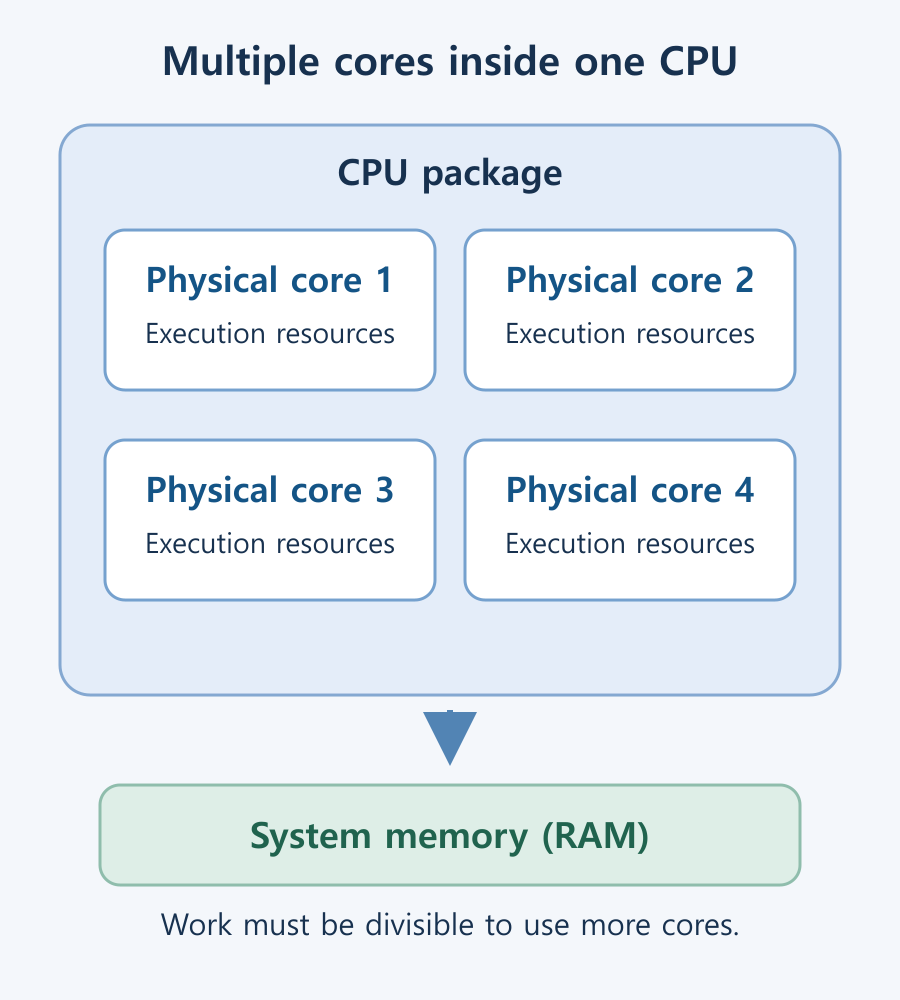
The diagram illustrates four cores that can take on different pieces of work. It is not a reproduction of a particular chip layout. A core can itself contain multiple execution units, so four cores should not be interpreted as a limit of exactly four instructions being processed at once.
How are cores different from threads?
A core is a physical execution resource. In a CPU specification, a thread refers to a hardware execution context to which the operating system can assign work. The operating system sees these contexts as logical processors. Core and thread counts may be equal, but they do not have to be.
| Term | Meaning | What to check |
|---|---|---|
| Core | A physical unit that executes instructions | Architecture and capability matter as well as count. |
| CPU thread | A hardware execution context | Different core types may expose different numbers. |
| Software thread | An execution flow within a process | Software can create more threads than the CPU specification lists. |
Some CPUs use simultaneous multithreading (SMT) to expose two logical processors per core. Those logical processors share resources within the same physical core; a second core has not appeared. Intel’s explanation of Hyper-Threading describes this use of multiple execution contexts. For the distinction between hardware and software threads, see CPU threads, logical processors, and software threads.
Why more cores do not always mean more speed
A program must be able to split its work into tasks that can run in parallel to make full use of multiple cores. Rendering and independent calculations can benefit when the software distributes work effectively. A task that must wait for the previous step to finish still has that dependency after more cores are added.
Consider converting 100 separate files. The files may be suitable for parallel processing, but spare cores will not automatically take over if the program processes only one file at a time. The cost of dividing the work, memory bandwidth, and storage speed can also limit the total improvement.
Compare performance per core, clock behavior, cache, power limits, and cooling alongside core count. A game may show little benefit from additional CPU cores when the graphics card is already the limiting component. These differences make core count or GHz alone an unreliable ranking method across processor generations.
How to read hybrid P-core and E-core specifications
Some processors combine cores with different characteristics. Intel’s Performance-cores, or P-cores, and Efficient-cores, or E-cores, are an example of a hybrid design. The operating system considers the available cores and the work to be scheduled. A total core count does not imply that every core has identical performance.
For example, the Core i7-12700K specification lists eight P-cores and four E-cores: 12 cores and 20 threads in total. On this model, each P-core provides two threads and each E-core provides one. By contrast, the Core Ultra 7 265K specification lists eight P-cores and 12 E-cores, with 20 cores and 20 threads overall. There is no universal rule that an Intel CPU has twice as many threads as cores.
These examples illustrate different configurations, not a performance ranking between the two products. Check the exact model’s core layout and measurements for your applications. Intel’s developer guide to the 12th-generation hybrid architecture provides more detail about topology and scheduling.
How to check your PC’s core count
- Press Ctrl + Shift + Esc to open Task Manager in Windows. If your version opens a compact view, switch to its detailed view.
- Select Performance → CPU.
- Read Cores and Logical processors separately. The former is the physical core count; the latter is the number of execution contexts currently exposed to the operating system.
If the values differ from the advertised specification, first confirm the complete CPU model name. A virtual machine can show the virtual processors assigned to it, and firmware settings that disable cores or SMT can change the reported values. Avoid changing boot or BIOS settings before establishing the cause. Linux users can refer to the guide to checking CPU names, cores, and threads on Linux (Korean).
How to compare core counts for your workload
- Documents and web use: Consider responsiveness in your usual programs, RAM, and SSD configuration before prioritizing the highest core count.
- Gaming: Compare the actual games, resolution, and graphics card combination you will use. Games differ in how they distribute work and where the main processing bottleneck lies.
- Rendering, encoding, and development: Identify the CPU-bound stages and how well the software parallelizes them. GPU acceleration or licensing limits may reduce the benefit of extra CPU cores.
- Multitasking and virtual machines: Consider simultaneous workload demand together with memory capacity and storage bandwidth.
Once you have a shortlist, compare completion time and power use under equivalent workload conditions. Whether your software can use the additional cores is a more practical question than a universal claim that everyone needs a particular number of cores.
M.2 SSD Overheating: Symptoms, Temperature Checks, and Cooling
Learn how to distinguish possible thermal throttling from other SSD slowdowns, check temperatures with CrystalDiskInfo or manufacturer tools, and improve cooling using model-specific guidance.
What Is a CPU Socket? Types and Motherboard Compatibility Checks
Understand CPU sockets and LGA, PGA, and BGA connections. Follow a practical checklist for motherboard CPU support, BIOS versions, memory, power, and cooler compatibility.

What Is Integrated Graphics? Differences from a Graphics Card and How to Choose
Compare integrated graphics with a separate graphics card, including shared RAM and upgrade options. Check CPU graphics support, workload requirements, and common causes of missing display output.

What Are CPU Cores? Core Counts and Performance Explained
Understand physical CPU cores, logical processors, hybrid core layouts, and the limits of core-count comparisons. Learn how to check your PC and judge processors for your workload.

Home Printer Buying Guide / Printing Technologies, Running Costs, and Essential Features
Choose a home printer by matching its printing technology, maintenance needs, and total running costs to your usage. Compare inkjet, ink tank, and laser options, along with two-sided printing, scanning, wireless connections, and installation requirements.

Laser Printers / Features, Advantages, and Disadvantages
Understand how laser printers work, what toner and drums do, and where the technology's strengths and limitations matter. Compare document printing, consumable costs, paper compatibility, and inkjet alternatives to decide whether a laser printer suits your needs.

What Are CPU Threads? Cores, Logical Processors, and Software Threads
Learn the difference between hardware threads, software threads, logical processors, and physical cores. Understand SMT resource sharing and check the counts reported by Windows.