Laser Printers / Features, Advantages, and Disadvantages
A laser printer uses light and static electricity to form an image with a powdered printing material called toner, transfers that image to paper, and fixes it with heat and pressure. It is well suited to sharp text documents and multipage print jobs, but photo quality, consumable costs, and installation space vary by model. Laser printers are not always faster or cheaper to run than inkjet printers, so compare them against the documents you print and your expected workload.
How Laser Printers Work and What the Main Components Do
The laser does not burn letters directly into the paper. Instead, it creates an image on a cylindrical photosensitive drum, whose electrical properties change when exposed to light. Toner follows that image and is then transferred to the paper. This use of light and electrical forces is called electrophotographic printing.
- Charging: An electrical charge is applied to the drum surface.
- Exposure: The laser changes the charge pattern on the drum according to the print data.
- Development: Toner adheres to the image formed on the drum.
- Transfer: Electrical forces move the toner image onto the paper.
- Fixing: Heat and pressure bond the toner to the paper.
Remaining toner is then removed from the drum to prepare for the next print. Component layouts and the transfer path for color images differ between products; these steps describe the basic process. See Canon's explanation of laser printer technology for details about the mechanism and fixing technologies.
| Component | Purpose | What to Check |
|---|---|---|
| Toner cartridge | Supplies the toner that creates text and images | Exact part number, price, rated yield, and differences between supplied and replacement cartridges |
| Photosensitive drum | Provides the surface on which the toner image is formed | Whether it is integrated with the toner cartridge or replaced separately, replacement cost, and maintenance messages |
| Fuser | Fixes toner to paper using heat and pressure | Supported paper types and weights, and whether replacement or repair requires service |
The toner cartridge and drum perform different jobs. Canon describes an integrated cartridge design that combines the drum and other key components, while Brother explains a design with separate toner cartridges and drum units. Replacing toner therefore does not always mean that you are also getting a new drum.
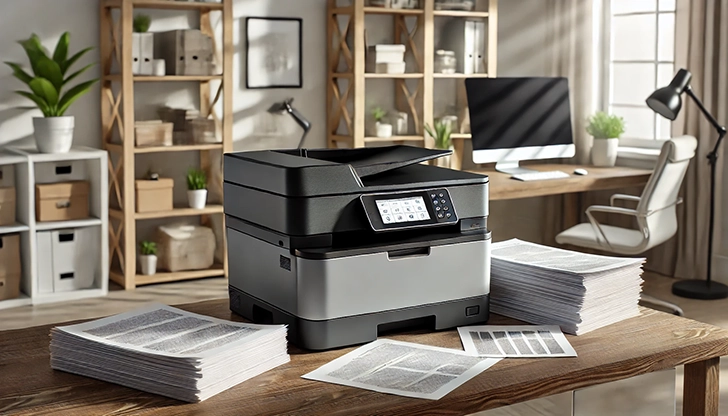
Advantages of Laser Printers
A Good Fit for Text Documents
Laser printers are worth considering for reports, contracts, study materials, and other documents with plenty of text and lines. Compare monochrome models if you only need black-and-white output, or color models for charts and business documents that rely on color. Brother's inkjet and laser printer comparison describes their general strengths for documents and photos.
Printing technology alone does not determine sharpness. Even on the same device, economy mode, resolution, and paper settings can affect the result. If small text or fine lines matter, check a sample printed with the settings you intend to use.
Suitable for Multipage Print Jobs
For printing many pages at once, continuous print speed and paper tray capacity are useful comparison points. When checking ppm, or pages per minute, make sure the figures refer to comparable conditions, including color versus monochrome and single-sided versus two-sided printing. Some inkjet printers are fast too, so do not judge speed solely by the technology's name.
If you often print just one or two pages, also check the time it takes for the first page to come out. Starting a job from standby or sleep mode is a different measure from continuously printing a long document. If you need automatic two-sided printing, check both whether it is supported and its printing speed.
No Liquid-Ink Nozzles to Keep Clear
Laser printers do not eject liquid ink through nozzles, so they do not have the same maintenance concerns associated with dried ink clogging those nozzles. If you print mainly black-and-white documents and often leave the printer unused, this difference can be a reason to consider a monochrome laser model first.
That does not mean a laser printer needs no care during long periods of nonuse. Toner and drums can deteriorate or reach their replacement point, and paper storage conditions can affect the output. Follow the product manual's storage and consumable replacement instructions.
Disadvantages and Limitations of Laser Printers
Replacement Costs Can Extend Beyond Toner
An inexpensive printer can still cost more overall if replacement toner is expensive or the drum must be replaced separately. Depending on the model, maintenance may also involve a transfer belt, waste toner container, or fuser. Do not estimate all running costs from toner prices alone. Check the model's consumable list and manual for the relevant parts and replacement criteria.
Color models generally use cyan, magenta, and yellow toner in addition to black. Check the price and rated yield of each color, along with what the specific model allows you to print when one color runs low. A color laser printer is not necessarily more expensive to run than every inkjet; include ink tank models in your comparison and calculate costs for your expected usage.
Dividing the toner price by its advertised page yield estimates the cost of toner alone. Add any separate consumables, such as drums, and remember that the advertised yield is not a guarantee. HP's toner page yield guidance explains the difference between tests based on ISO (International Organization for Standardization) methods and actual printing. It also notes that supplied introductory cartridges may yield fewer pages than replacement cartridges.
Photos and Specialty Paper Need Separate Checks
Color laser printers can print documents containing photos, but if photo printing is your main purpose, compare the results with a photo inkjet printer. Color reproduction, tonal transitions, paper texture, and supported sizes differ by product. A resolution figure or a claim of color support does not guarantee the photo quality you want.
Do not simply put inkjet-only photo paper or labels into a laser printer. Check that the media can withstand the fixing process and that your particular model supports it. Brother's special paper instructions warn that inkjet paper can cause jams or damage the machine. Use your printer's manual to confirm permitted paper weights and the correct feeding path.
Allow for Installation Space and Power Use
Products with color toner, drums, larger paper trays, or a scanner may need more room for installation and maintenance. However, compact monochrome models also exist, so laser printers are not all large or heavy. Check more than the dimensions of the closed device: allow room to extend the output tray, open covers, and remove consumables.
Because the fixing process uses heat, power consumption during printing is worth checking. However, fuser technology and power-saving design vary, so printing power alone does not establish that electricity bills will always be higher. Compare standby and sleep consumption alongside how long the printer will spend in each state. Canon's technology explanation describes fixing systems that heat when needed; not every printer continuously maintains the same level of heating in standby.
What to Compare with an Inkjet Printer
This table gives general directions for choosing between the technologies. Prices, speed, and quality vary by model, so make the final decision using the specifications, consumable information, and print samples of your shortlisted products.
| Criterion | Laser Printer | Inkjet Printer |
|---|---|---|
| Printing consumables | Powdered toner; check additional components such as the drum | Liquid ink; distinguish cartridge models from ink tank models |
| Typical uses to compare | Text and chart documents, multipage jobs | Color documents and photos on supported media |
| Gaps between uses | No dried-ink nozzle issue, but consumables and paper still need care | Check model-specific nozzle and printhead maintenance requirements |
| Costs | Add the printer, toner, separate drums, and other relevant parts | Check the printer, ink, and printhead or waste-ink maintenance costs |
| Photos and specialty paper | Check laser compatibility and the model's media limits | Check photo quality, photo paper support, and borderless printing |
When Is a Laser Printer a Suitable Choice?
- Most of your documents are black and white: Start by comparing monochrome laser models. Decide whether you actually need color before paying for that capability.
- You print many pages at once: Check continuous print speed, paper tray capacity, and automatic two-sided printing.
- You need an occasional document printer: A laser model can reduce the need for ink nozzle maintenance. If you print very little, also compare the cost of using an external printing service.
- You need color business documents: Compare document quality alongside the replacement costs of each toner color. If photo printing matters, consider photo inkjets too.
Laser technology does not automatically include scanning, copying, wireless connectivity, or automatic two-sided printing. Decide which features you need, then check the specifications of models sold in your region. When shortlisting a home printer, the home printer buying guide's running-cost and feature criteria (in Korean) can also help you compare the purchase price with your usage requirements.
Laser Printers / Features, Advantages, and Disadvantages
Understand how laser printers work, what toner and drums do, and where the technology's strengths and limitations matter. Compare document printing, consumable costs, paper compatibility, and inkjet alternatives to decide whether a laser printer suits your needs.
Home Printer Buying Guide / Printing Technologies, Running Costs, and Essential Features
Choose a home printer by matching its printing technology, maintenance needs, and total running costs to your usage. Compare inkjet, ink tank, and laser options, along with two-sided printing, scanning, wireless connections, and installation requirements.

Network Port Ranges: Well-Known, Registered, and Dynamic Ports
Learn how IANA divides network ports into well-known, registered, and dynamic ranges. The guide also explains why a registered port does not identify a running service and why a system's ephemeral-port range may differ.

TTF, TTC, OTF, and OTC Font Files: Differences and How to Choose
TTF and OTF usually contain one font; TTC and OTC are collections that can hold several. Learn what each extension indicates, what it does not, and how to choose a file to install.

ChatGPT / GPT-5.6 or GPT-6 Astra? Choosing a Model by Task
Choose a ChatGPT model and reasoning level based on task complexity, speed, and the quality you need. This guide explains when GPT-5.6, GPT-6 Astra, higher reasoning, or a Pro option may be useful for writing, coding, and analysis.