Minecraft Enchantments: Enchanting Table, Anvil, and Gear Guide
Minecraft enchantments add abilities to tools, weapons, and armor, such as faster mining, increased damage, and better protection. In Survival mode, you can use an enchanting table for random enchantments or combine enchanted books with equipment in an anvil to apply specific effects. Building useful gear also means understanding experience costs and which enchantments cannot go together.
Enchantment levels and player levels are different
The Roman numerals in names such as Efficiency IV and Unbreaking III show an enchantment's level. I means 1, II means 2, III means 3, IV means 4, and V means 5. Each enchantment has its own maximum level, separate from the player's experience level.
A “level 30 enchantment” refers to the experience level required to select an enchanting-table option. It does not mean that the item receives a level 30 enchantment, and it does not guarantee the maximum level of every effect. The outcome depends on the item and the available option.
This guide focuses on normal Survival gameplay without mods or server plugins. Some enchantments work differently in Java Edition and Bedrock Edition, so check edition-specific conditions when choosing equipment.
How to use an enchanting table and arrange bookshelves
Materials and a 15-bookshelf layout
Craft an enchanting table with 1 book, 2 diamonds, and 4 obsidian. You also need an item to enchant, lapis lazuli, and experience. One book requires 3 paper and 1 leather; one bookshelf requires 6 wooden planks and 3 books.
To unlock higher-level options, place 15 ordinary bookshelves in valid positions. A straightforward arrangement is a 5-by-5 outline with the enchanting table in the center and one empty block between the table and the bookshelves. Place the bookshelves at the same floor level and leave one position in the outline open as an entrance. This gives you exactly 15 bookshelves.
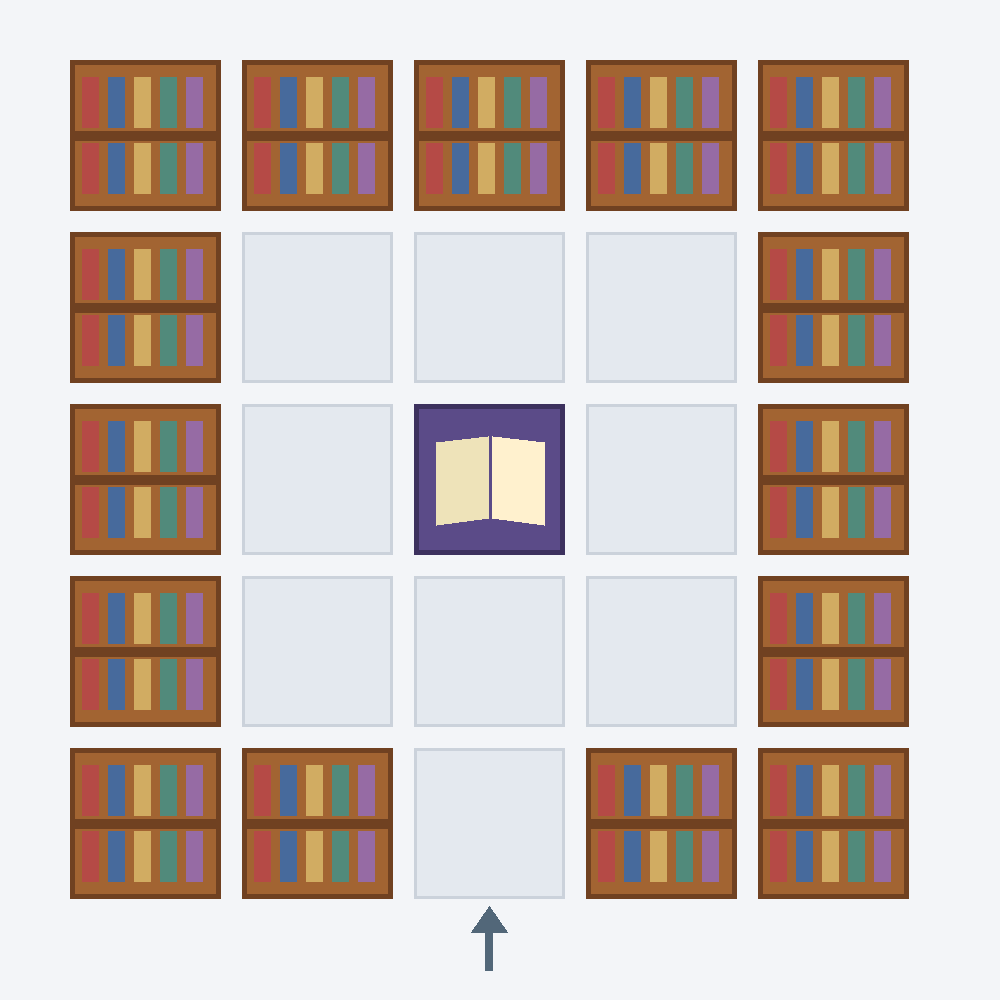
The diagram shows the arrangement from above. Brown squares are bookshelves, the purple center square is the enchanting table, and the other squares remain empty. The opening at the bottom center is the entrance. Keeping torches, carpets, and decorations out of the gap helps avoid bookshelf-detection problems across both editions.
Adding more than 15 bookshelves does not keep increasing the available level requirement. Chiseled bookshelves, which let you store and retrieve books, do not replace ordinary bookshelves for powering an enchanting table. See the official Minecraft enchanting guide for the basic setup and the official chiseled bookshelf overview for the distinction.
Choosing an option and checking the experience cost
- Open the enchanting table and place an unenchanted piece of equipment or a plain book in the item slot.
- Add lapis lazuli and inspect the three options. Hover over or highlight an option to check the displayed enchantment and required player level.
- Select an option once you meet its level requirement and have enough lapis lazuli.
- Take the enchanted item and read its description. It may receive additional effects beyond the one shown in the preview.
The required level and the levels actually spent are different. The three enchanting-table options cost 1, 2, and 3 lapis lazuli and experience levels respectively, from top to bottom.
| Option | Lapis cost | Levels spent | Requirement |
|---|---|---|---|
| Top | 1 | 1 | Meet the level shown in the interface. |
| Middle | 2 | 2 | Meet the level shown in the interface. |
| Bottom | 3 | 3 | Requires level 30 with 15 valid bookshelves. |
If you select the bottom option at exactly level 30, your player level drops to 27. You must earn more experience before using another level 30 option. To add effects to an already enchanted item, use an anvil rather than putting it back into the enchanting table.
How to use enchanted books and an anvil
Obtaining the book you need
Enchanting a plain book stores an enchantment for later use. You can also obtain enchanted books through librarian villager trades, fishing, and loot chests in certain structures. The available enchantments vary by source; one method will not provide every effect.
For example, Mending is not available from an enchanting table. Obtain it through another eligible source, such as librarian trading, suitable loot, or fishing. Adding bookshelves or repeatedly choosing high-level table options will not produce Mending.
Librarian trading is useful for obtaining the same effect repeatedly after finding a villager who sells the required book. You cannot simply choose any enchantment from any librarian, so inspect the trade's enchantment and level first. Prepare the books and emeralds required by the offer; applying the purchased book to equipment still has a separate anvil experience cost.
Worlds with the Villager Trade Rebalance experiment enabled can have different librarian offers and acquisition conditions. Check your world settings before following a trading guide. The official Java Edition 26.1 release notes distinguish changes to librarian trading under this experiment.
Applying a book to equipment
Craft an anvil with 3 iron blocks and 4 iron ingots. As described in the official anvil overview, it can apply enchantments from books or combine two items of the same type.
- Open the anvil and place the equipment you want to improve in the left slot.
- Place the enchanted book in the right slot.
- Read the output item's description to confirm that the intended effects will be applied. If a book contains several enchantments, only those compatible with the equipment transfer.
- Check the displayed experience cost, then take the output item. Before taking it, you can remove the inputs to cancel the operation.
Combining matching enchantments at the same level can raise that enchantment by one level, up to its normal maximum. For example, two Unbreaking II books can become one Unbreaking III book. Levels are not simply added together: combining two Unbreaking III books does not create Unbreaking IV.
Previous anvil repairs and combinations can increase later work costs. If you plan to add several effects, gather the materials and compare the possible results and costs before proceeding. In Survival mode, an operation marked “Too Expensive!” cannot be completed merely by collecting more experience. An anvil does not normally bypass incompatible-enchantment restrictions.
Common Minecraft enchantments and their effects
The following tables cover useful effects for early and mid-game Survival, rather than every enchantment in the game. Maximum levels refer to normal acquisition and combination limits. Consult Microsoft Learn's introduction to enchantments for basic effects and the official complete enchantment list for individual levels.
Tools and equipment maintenance
| Enchantment | Maximum level | Purpose and limitations |
|---|---|---|
| Efficiency | V | Increases block-breaking speed when using an appropriate tool. |
| Fortune | III | Increases the quantity or chance of drops from certain blocks. |
| Silk Touch | I | Allows eligible blocks to be collected in block form. |
| Unbreaking | III | Reduces the chance of durability being consumed. It does not make equipment permanent. |
| Mending | I | Uses collected experience to restore damaged equipment's durability. |
Fortune does not increase drops from every block, and Silk Touch does not let you collect every block. Choose Fortune when you want more resources from eligible ores; choose Silk Touch when you want to keep eligible ore blocks intact.
Mending works when you collect experience. Leaving a Mending tool in your inventory is not enough: hold the tool or wear the Mending armor while receiving experience. Repair equipment before its durability runs out completely.
Swords and bows
| Enchantment | Maximum level | Main effect |
|---|---|---|
| Sharpness | V | Increases melee damage. |
| Smite | V | Increases damage against undead mobs, such as zombies and skeletons. |
| Bane of Arthropods | V | Helps against arthropod mobs, such as spiders. |
| Looting | III | Increases the quantity or chance of eligible mob drops. |
| Knockback | II | Pushes targets farther away when hit with a sword. |
| Fire Aspect | II | Sets melee targets on fire. |
| Power | V | Increases damage dealt by arrows from a bow. |
| Infinity | I | Lets a bow fire ordinary arrows without consuming them. |
In Survival mode, an Infinity bow still requires at least one ordinary arrow in your inventory. Infinity does not prevent bow durability loss or provide unlimited special arrows. Knockback can create useful distance, but it may be inconvenient when you want to keep landing melee attacks; choose it according to your play style.
Armor and curses
| Enchantment | Maximum level | Main effect |
|---|---|---|
| Protection | IV | Reduces several types of incoming damage. It does not grant immunity to all damage. |
| Fire Protection, Blast Protection, Projectile Protection | IV each | Specialize in fire, explosion, and projectile damage respectively. |
| Feather Falling | IV | Reduces fall damage when applied to boots. |
| Respiration | III | Extends underwater breathing time when applied to a helmet. |
| Aqua Affinity | I | Reduces the underwater mining speed penalty when applied to a helmet. |
| Thorns | III | Can damage attackers, but may consume additional durability. |
| Curse of Binding | I | Prevents equipped items from being removed normally. |
| Curse of Vanishing | I | Normally makes an item disappear on death instead of dropping it. |
Be especially careful before equipping an item with Curse of Binding in Survival mode. It can come off in circumstances such as the item breaking or the player dying, but valuable enchantments on the same item are not a good reason to try wearing it without considering the curse.
Which enchantments cannot be combined?
Different effects are not always compatible on the same item. The table below lists common conflicts in normal Survival gameplay. Having enough books or experience does not let an anvil combine these effects on one item.
| Equipment | Incompatible enchantments | How to choose |
|---|---|---|
| Mining tools | Fortune and Silk Touch | Choose increased resource drops or collecting eligible blocks intact. |
| Swords | Choose one: Sharpness, Smite, or Bane of Arthropods | Decide between general combat and targeting specific mob types. |
| One armor piece | Choose one: Protection, Fire Protection, Blast Protection, or Projectile Protection | Choose broad damage reduction or a specialized defense. |
| Bows | Infinity and Mending | Choose ordinary-arrow conservation or repairs using experience. |
| Crossbows | Multishot and Piercing | Choose a spread of projectiles or arrows that pass through targets. |
The protection restriction applies to one armor piece. You can still put Protection on a helmet and Fire Protection on a chestplate. The official chestplate overview explains this restriction.
Knockback and Fire Aspect can be applied to the same sword. You may prefer not to use both, but the combination itself is allowed. The incompatibility between Infinity and Mending is also recorded in the official change notes introducing that restriction.
Choosing enchantments for your equipment
No single setup is best for every situation. Use your frequent activities and available resources to choose a goal. These are examples of finished equipment, not a requirement to collect every maximum-level book before using your gear.
- Resource-mining pickaxe: Efficiency V + Fortune III + Unbreaking III + Mending. Use it to obtain resources directly from eligible ores. For a separate pickaxe that preserves blocks, replace Fortune with Silk Touch I.
- General-purpose mob-fighting sword: Sharpness V + Looting III + Unbreaking III + Mending. Add Fire Aspect and Knockback if they suit your combat style. A separate sword intended mainly for undead mobs can use Smite instead of Sharpness.
- Exploration armor: Aim for Protection IV + Unbreaking III + Mending, then add Feather Falling to boots. For frequent underwater exploration, add Respiration and Aqua Affinity to your helmet.
- Bow for conserving ordinary arrows: Power V + Unbreaking III + Infinity. If you prefer maintaining the bow with experience, choose Mending instead of Infinity and obtain arrows separately.
Early on, prioritize effects with an immediate benefit, such as faster mining on your main pickaxe or reduced fall damage on your boots. Add Unbreaking and Mending to equipment you plan to keep. Prepare separate tools for conflicting purposes rather than trying to put every effect on one item.
What to check when enchanting does not work
- The level 30 option does not appear: Check that 15 ordinary bookshelves are in valid positions and that the gap between the shelves and the enchanting table is clear.
- You cannot select an option: Check your experience level and lapis lazuli supply. If the item is already enchanted, use an anvil to add further effects.
- A book does not add the expected effect: Check whether the enchantment applies to that equipment and whether an existing effect conflicts with it. Read the output description before taking the item.
- You want to start over: A grindstone can remove ordinary enchantments, but it does not return them as books. You can lose valuable effects, including Mending, so check the item before proceeding.
A grindstone removes non-curse enchantments and returns some experience; it does not remove curses. The official Village & Pillage release notes describe this distinction. Removing enchantments changes the item, so keep the equipment as it is if you are unsure whether you want to lose its effects.
Minecraft Fortune Enchantment: Uses, Tools, and How to Get Fortune III
Learn where Fortune improves block drops, which tools to use, and how it differs from Silk Touch. Follow the steps to obtain Fortune III and understand common drop exceptions.

Minecraft Bedrock World Save Location on Windows: Backup and Restore
Find the current and legacy Minecraft Bedrock world folders on Windows and identify your saves. Learn how to back up, transfer, and restore worlds using folder copies or .mcworld exports.
How to Show Coordinates in Minecraft Bedrock Edition
Learn how to show and hide coordinates in Minecraft Bedrock, read X, Y, and Z, and record your base location. The guide also covers copying coordinates and resolving permission problems in shared worlds.
Minecraft Java Edition: How to Craft and Use Scaffolding
Learn the scaffolding recipe and Java Edition controls for building columns, climbing, extending platforms, and removing scaffolding. Screenshots explain the horizontal support limit and how to reuse the blocks.

Minecraft Biomes Explained: Types, Resources, and How to Find Them
Learn how Minecraft biomes differ across the Overworld, Nether, and End. Compare useful environments, distinguish biomes from structures, and find locations using debug information or commands.
What Is Minecraft? Game Modes, Editions, and Getting Started
Learn what you can do in Minecraft, how Survival and Creative differ, and how to choose between Java and Bedrock Edition. This beginner's guide also explains multiplayer options and the essentials to check before your first world.
Minecraft Efficiency Enchantment: Tools, Mining Speed, and Efficiency V
Understand which tools benefit from Efficiency and why mining speed varies. Learn how to obtain Efficiency V, assess instant-mining conditions, and maintain your tools.

Minecraft Enchantments: Enchanting Table, Anvil, and Gear Guide
Learn how to enchant Minecraft equipment, arrange 15 bookshelves, and apply enchanted books with an anvil. Compare useful effects, experience costs, and incompatible combinations to choose gear for your Survival world.